
By Aneta Szostak-Silva, Co-Founder and Geospatial Engineer at FullWave Geoconsulting, Portugal. Aneta has contributed to national and regional LiDAR programs worldwide, with experience spanning production, quality assurance, and technical advisory. Her work includes co-developing technical specifications for national LiDAR programs and supporting their implementation and validation.
Large-scale airborne LiDAR project. Sensor issues. Bad weather. On top of that, the GNSS network proves unstable. Each reflight adds another piece to an already messy puzzle. Time is running out. You are only now nearing the end of geometric adjustment, even though by this stage the project should be much further along. Delivery deadlines are approaching fast, and you know that from here on, every minute counts. There is still supplier classification to verify, deliverables to generate, and LAZ headers edits to match project requirements.
Anyone who has faced a situation like that knows what comes next. You reach for the tools you trust. In my case: LAStools. With a geodetic background completed in the early 2000s, my university education included only a few hours of very basic programming. Early in my career, command-line software was something I approached with hesitation.
In practice, however, once I started working with LAStools, I found that the tools were designed in a way that made them surprisingly accessible and straightforward to use. Over time, I reached the point where I felt more lost in traditional GUIs than in the command line. Eventually, I began working almost exclusively from the command line—nearly every day, for more than 15 years.
For that reason, when laslook was released three years ago, I remained skeptical of a GUI carrying the LAStools name. At first glance, it seemed like just another viewer that I did not really need. I was already comfortable with the software environment I had been using for years. That changed only recently, when I was asked to review the LAStools software I use in my daily professional work. That was the moment I decided to give laslook one more chance.
At first, it felt a bit like before. Lots of small windows taking over the visualization space — and for anyone doing data evaluation, screen space is sacred. You know what I mean if you’ve watched those movies where people are saving the world while standing in front of walls full of giant synchronized screens. Anyone who works with LiDAR has probably, at some point, wanted exactly that kind of setup. But over time, I found myself pleasantly surprised.
Want to quickly check the coordinate reference system used in your project, the data precision, or the LAS format version? You no longer need to run lasinfo for that. It is enough to select one of the files in the file browser [2 in the image below], and the header information [3] becomes instantly available.
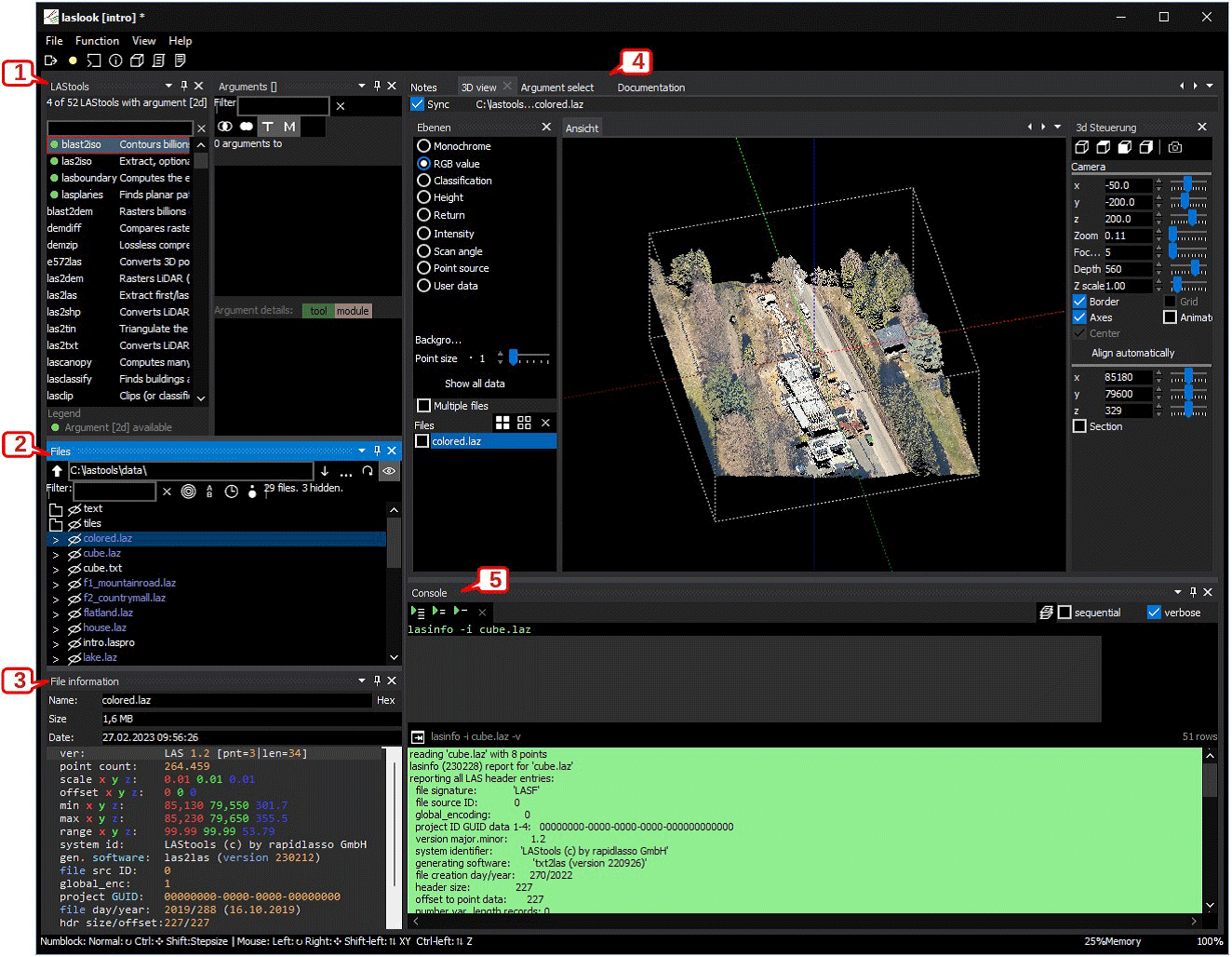
Figure 1 laslook interface (image from software documentation)
Now consider another common scenario: You are preparing a delivery under pressure. You make a few last-minute corrections, do not document them properly, and then a month later—while preparing the next block of the same project—you suddenly find yourself wondering: How exactly did I change the global encoding? Anyone who has not experienced that situation is welcome to cast the first stone.
Then comes the next question: Which LAStools app allowed me to change that setting? In the past, I often found myself making nearly wild guesses while navigating through the jungle of README files in the LAStools bin directory. Now, I can simply type part of the argument I am looking for into the Argument select window [4 in the image above] and immediately see which LAStools functions use it.
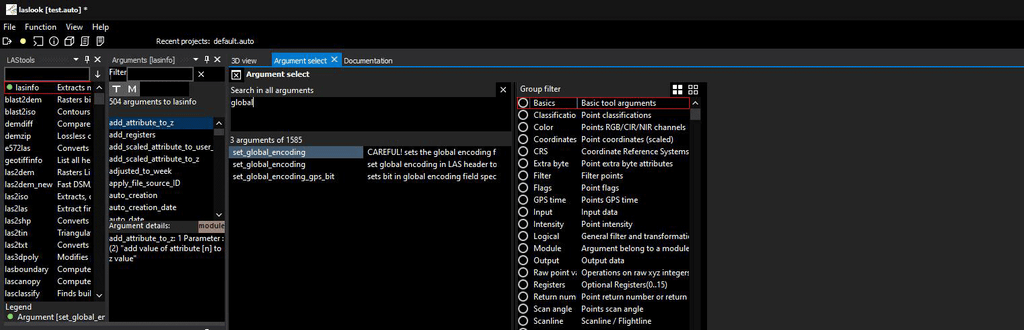
Figure 2 Global argument search
That alone is a substantial improvement. At this point, I am already convinced enough to change some of my long-established habits and move more of my work into laslook. I will likely no longer be opening README files directly from my hard drive, and I certainly do not see much reason to continue building command lines in a plain text editor when a better workflow is available.
Working within laslook simply makes the process easier, thanks to instant access to documentation, searchable function arguments, and an input assistant that suggests prompts as you type. That last feature is especially useful in the moments when you know roughly what you want to do, but do not yet remember the exact syntax.
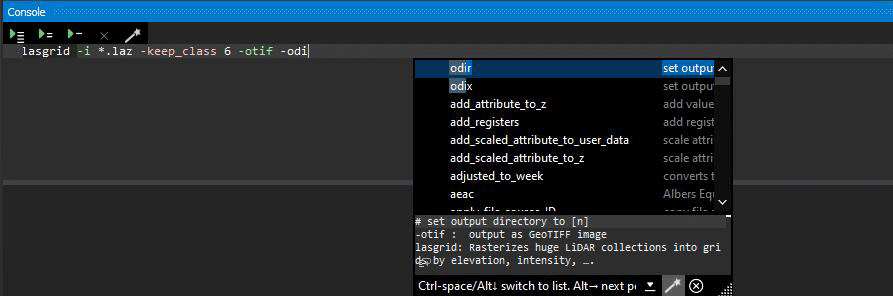
Figure 3 Input assistance in command prompt console
The additional feature that I particularly appreciate is execution statistics: Want to compare the performance of different versions of your script? Estimate how changing the size of a buffer—or any other parameter—affects your processing time on large-scale datasets? Or perhaps you simply want to recover a command you worked on a few weeks ago and can no longer find anywhere on your local drive. It is all there: structured, labeled, and organized.
You can review the duration of different processing runs and bring back into the console the exact script version you worked on at the time. This is the kind of functionality that may not sound essential at first—but quickly proves its value in day-to-day production work.
Last, but certainly not least, laslook feels like a refreshed and more practical evolution of lasview. It allows for quick visualization of data in different display styles, as well as the ability to isolate only the portions of the dataset relevant to the task at hand. That can be particularly useful when testing scripts and wanting to see the direct impact of specific functions on the data.
The LiDAR industry continues to evolve—and LAStools continues to evolve with it. Laslookis a strong example of that progression.