
This blog post covers the new features of lasinfo.
Decode header encoding value
The latest enhancement involves the decoding of the `global_encoding` header word. This header word contains a bit sequence that describes various encoding options within the file. Previously, this word was displayed merely as a raw numerical value. However, without detailed information regarding the bit sequence, this information was of little practical use. While the numerical value is still displayed, the output is now supplemented with an explanation of the significance of each set bit. In versions prior to 260505, executing the command
lasinfo64 -i lake.laz -nc
produced the following output:

Starting with version 260505, the same command produces the following output:

This indicates that the file contains potential CRS information stored as a GeoTIFF VLR. If the points include GPS timestamps, these are encoded using GPS-Week notation. Another example file might yield the following result:
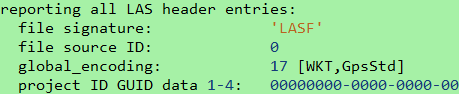
This would interpret encoding value 17 as a file containing a WKT VLR for CRS information and indicate that the GPS timestamps are in standard GPS notation.
CSV output to catalog file
Another new feature of lasinfo is the option for CSV export. Previously, it was necessary either to parse the text output of every single lasinfo run or to feed lasinfo’s JSON output into a JSON parser to create a sort of database for all LAS and LAZ files. As of version 260505, it is now possible to process numerous files simultaneously and save the results in a single CSV file. This file can be easily processed further using a spreadsheet program or imported directly into a database. The command is as straightforward as most LAStools commands:The call is as simple as most LAStools commands:
lasinfo64 -i *.laz -o summary.csv
The headers of all files are read, and the information is collected in the summary file. Open this file to review the results in a spreadsheet program such as LibreOffice or Excel:

The header contains the column descriptions corresponding to the header values. By default, only the header is parsed. However, if required, the CSV export can also include point statistics – analogous to the standard behavior of lasinfo. Since this process can be very time-consuming if many files need to be checked, this option must be forced using the additional argument „-full_csv“:
lasinfo64 -i *.laz -o summary_with_points.csv -full_csv
To retrieve information on all files within multiple subdirectories, the command can be extended with the „-subdir“ argument:
lasinfo64 -i *.laz -o summary_deep.csv -subdir
This „-subdir“ argument is implemented within the general LAS/LAZ reader. Therefore, it is not possible to use this argument universally throughout LAStools. For further information regarding the new features, please also see the lasinfo_README.md.
LAS 1.5 output
Like all LAStools, lasinfo also supports the new LAS 1.5 format. In the header, this includes the new encoding options described above, as well as the additional GPS header entries of min/max GPS time within the file and the optional additional GPS time offset. The new output lines for the new LAS 1.5 header values are:
min max gps time: 70291.064400000002934 71058.521999999997206
time offset: 0
WKT output
Available for some time – though perhaps not widely known – is the option to format the WKT-CRS-VLR within the output. By default, a LAS 1.4 WKT is displayed as a single-line entry and might look like this:
PROJCS["GDA2020 / GDA2020 / MGA 55S",GEOGCS["GDA2020",DATUM["Geocentric_Datum_of_Australia_2020",SPHEROID["GRS 1980",6378137,298.257222101,AUTHORITY["EPSG","7019"]],AUTHORITY["EPSG","1168"]],PRIMEM["Greenwich",0,AUTHORITY["EPSG","8901"]],UNIT["degree",0.0174532925199433,AUTHORITY["EPSG","9122"]],AUTHORITY["EPSG","7844"]],PROJECTION["Transverse_Mercator"],PARAMETER["latitude_of_origin",0],PARAMETER["central_meridian",147],PARAMETER["scale_factor",0.9996],PARAMETER["false_easting",500000],PARAMETER["false_northing",10000000],UNIT["metre",1,AUTHORITY["EPSG","9001"]],AXIS["Easting",EAST],AXIS["Northing",NORTH],AUTHORITY["EPSG","7855"]]
A simple argument converts this output into easily readable information. To obtain only the header containing the VLRs, a full point scan is not required. Therefore, the argument „-nc“ will be added:
lasinfo64 -i clout_with_WKT.laz -nc -wkt_format
This command retrieves the same information as above, but with semantic indentation to facilitate easy readability:
WKT OGC COORDINATE SYSTEM:
  PROJCS[GDA2020 / GDA2020 / MGA 55S,
    GEOGCS[GDA2020,
      DATUM[Geocentric_Datum_of_Australia_2020,
        SPHEROID[GRS 1980,6378137,298.257222101,
          AUTHORITY[EPSG,7019]],
        AUTHORITY[EPSG,1168]],
      PRIMEM[Greenwich,0,
        AUTHORITY[EPSG,8901]],
      UNIT[degree,0.0174532925199433,
        AUTHORITY[EPSG,9122]],
      AUTHORITY[EPSG,7844]],
    PROJECTION[Transverse_Mercator],
    PARAMETER[latitude_of_origin,0],
    PARAMETER[central_meridian,147],
    PARAMETER[scale_factor,0.9996],
    PARAMETER[false_easting,500000],
    PARAMETER[false_northing,10000000],
    UNIT[metre,1,
      AUTHORITY[EPSG,9001]],
    AXIS[Easting,EAST],
    AXIS[Northing,NORTH],
    AUTHORITY[EPSG,7855]]
This formatted output can also be generated using our wktformat tool to format a standalone WKT string.